> For the complete documentation index, see [llms.txt](https://docs.plenit.com/llms.txt). Markdown versions of documentation pages are available by appending `.md` to page URLs; this page is available as [Markdown](https://docs.plenit.com/productos/migrations/concepts/formats.md).
# Formatos de disco
Las dos vías de formato (Agente Acronis y VHD – Conversión de discos) y qué formatos admite cada una.
Al preparar la migración eliges en qué formato entregas el disco. Hay dos vías, según de dónde vengas.
### Agente Acronis
Vuelca directamente una copia de seguridad de Acronis para desplegarla después en Plenit. Es la vía cuando tu origen ya trabaja con Acronis como software de backup.
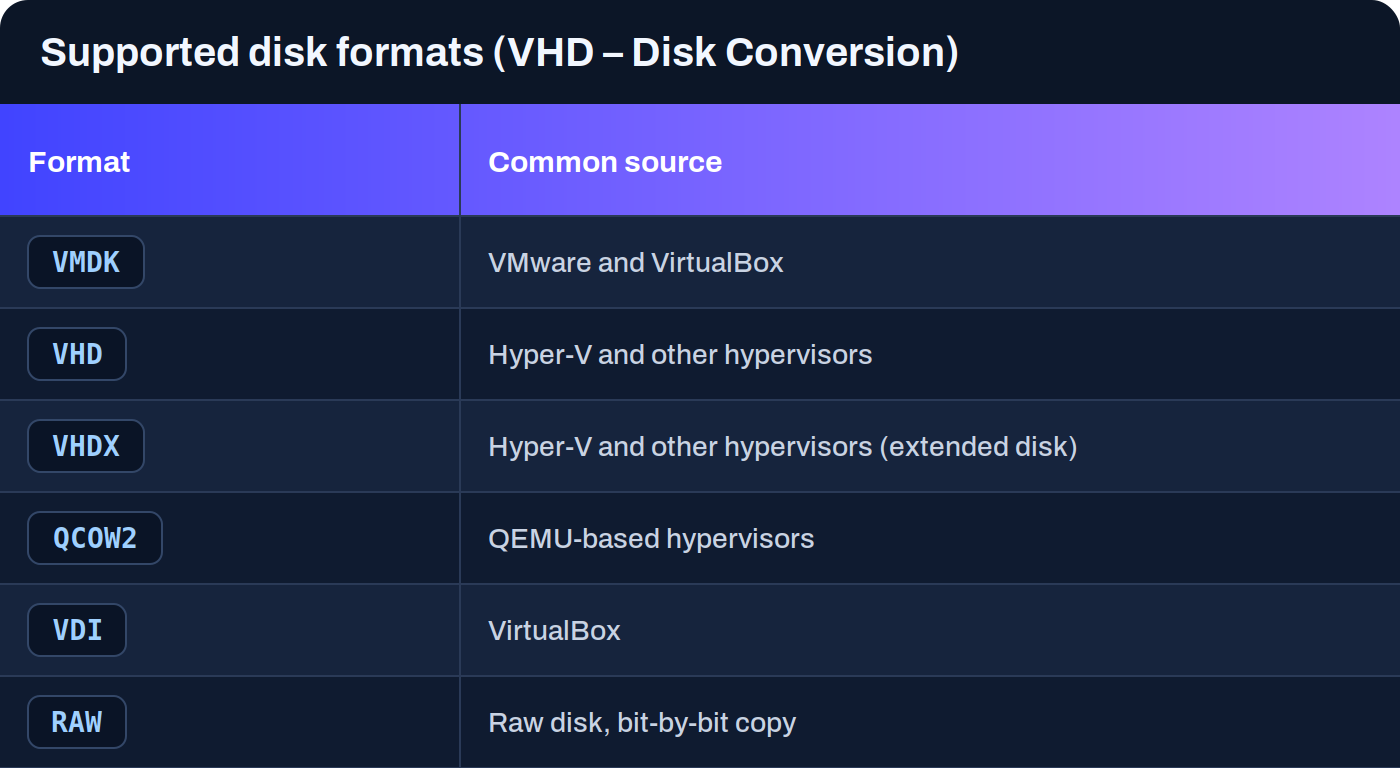
### VHD – Conversión de discos
Sube discos virtuales en varios formatos y la plataforma los convierte de forma automática para que sean compatibles. Es la vía general cuando exportas el disco desde un hipervisor o un cloud.
Además de estos formatos de disco, el flujo contempla imágenes **OVA** y los flujos basados en Acronis.
> #### 📘 No tienes que convertir tú el disco
>
> Si el formato de origen no es directamente utilizable, la conversión a un formato compatible la hace la plataforma. Tú entregas el disco tal y como lo exportas desde tu origen.
> #### 🚧 Compatibilidad según el origen
>
> La compatibilidad real depende del origen y del estado técnico del sistema. Algunos formatos han tenido limitaciones operativas concretas según el caso, así que conviene revisar la guía del origen específico antes de lanzar.
### Siguientes pasos
* Decide cómo llega el disco a Plenit en [Modos de transferencia.](/productos/migrations/concepts/transfer.md)
* Consulta la guía del origen concreto que vas a migrar en el apartado de [How-to.](/productos/migrations/how-to.md)
* Repasa el recorrido completo en [El proceso.](/productos/migrations/concepts/the-process.md)
---
# Agent Instructions
This documentation is published with GitBook. GitBook is the documentation platform designed so that both humans and AI agents can read, navigate, and reason over technical content effectively. Learn more at gitbook.com.
## Querying This Documentation
If you need additional information that is not directly available in this page, you can query the documentation dynamically by asking a question.
Perform an HTTP GET request on the current page URL with the `ask` query parameter, and the optional `goal` query parameter:
```
GET https://docs.plenit.com/productos/migrations/concepts/formats.md?ask=&goal=
```
`ask` is the immediate question: it should be specific, self-contained, and written in natural language.
`goal` is optional and describes the broader end goal you are ultimately trying to accomplish on behalf of the user. GitBook uses it to tailor the answer towards what is most useful for that goal.
The response will contain a direct answer to the question and relevant excerpts and sources from the documentation.
Use this mechanism when the answer is not explicitly present in the current page, you need clarification or additional context, or you want to retrieve related documentation sections.