> For the complete documentation index, see [llms.txt](https://docs.plenit.com/llms.txt). Markdown versions of documentation pages are available by appending `.md` to page URLs; this page is available as [Markdown](https://docs.plenit.com/fr/platform/billing/how-to/how-to-download-your-invoices.md).
# Comment télécharger une Facture
Télécharge une Facture isolée ou un lot par plage de dates, en PDF et XML.
Tu peux télécharger une facture précise ou un lot complet par plage de dates.
Tout se fait depuis **Utilisation**, dans l’onglet **Factures**.
### 1. Ouvre l’onglet Factures
Entre dans **Utilisation** et va à l’onglet **Factures**. Tu as la liste avec son numéro, son Organisation, sa période, son état (**Payé** ou **Impayé**) et sa base imposable. Si tu en cherches une en particulier, utilise le **Filtre** par recherche, état ou Abonnement.
### 2. Télécharge une facture individuelle
Ouvre la facture depuis la liste pour voir le document (émetteur, destinataire, période et montant) et télécharge-le depuis le visionneur lui-même.
### 3. Télécharge un lot
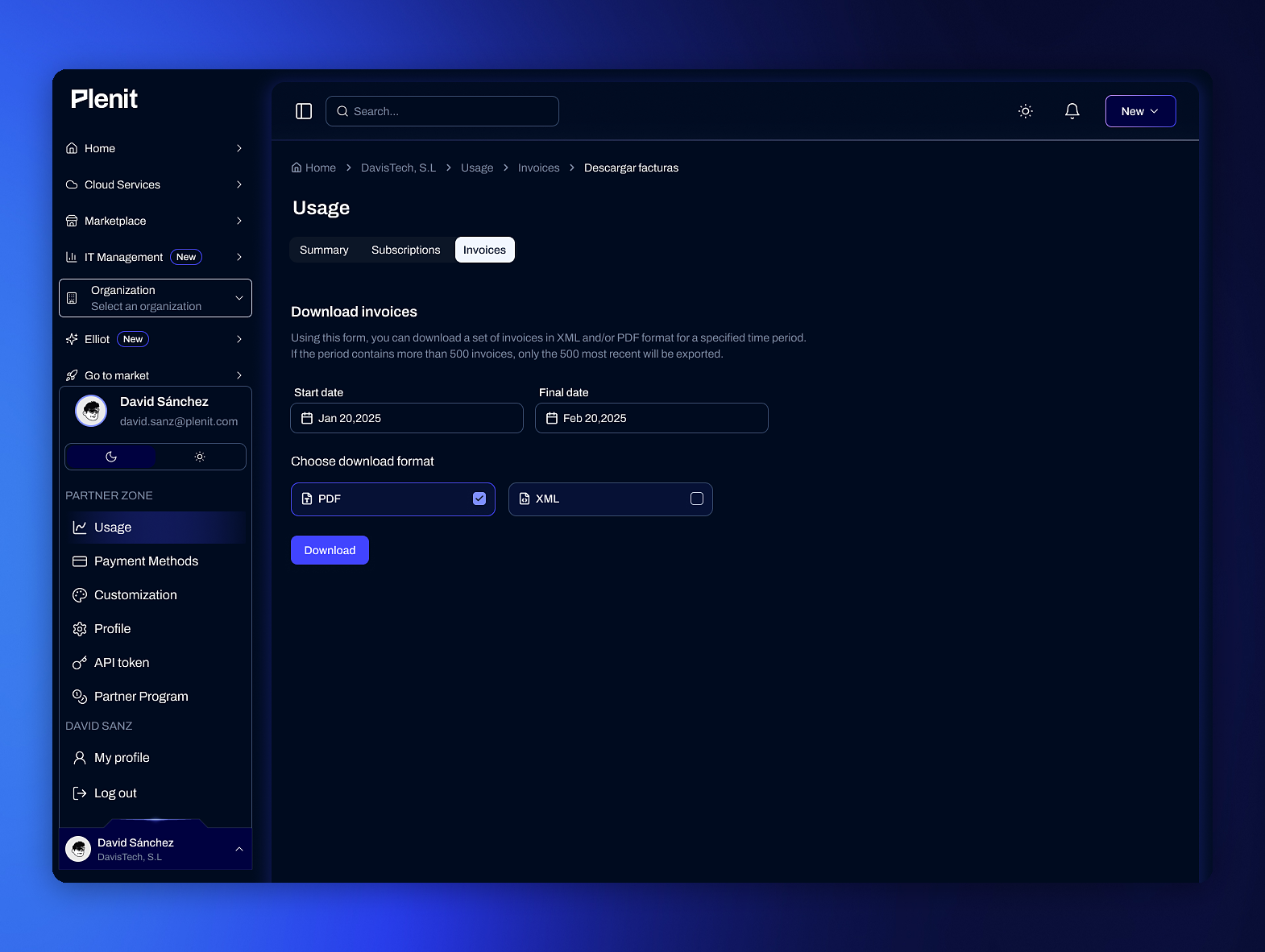
Pour en télécharger plusieurs à la fois, clique sur **Télécharger les factures**. Dans le formulaire :
* Choisis la **date de début** et la **date de fin** de la plage.
* Marque le **format**: **PDF**, **XML** ou les deux.
* Appuie sur **Télécharger**.
> #### 📘 Jusqu’à 500 par exportation
>
> Si la plage contient plus de 500 factures, seules les 500 plus récentes sont exportées. Si tu en as besoin de davantage, divise la plage en segments.
### Conclusion
Tu peux désormais enregistrer tes factures, une par une ou en lot, dans le format dont tu as besoin pour ta comptabilité.
### Étapes suivantes
* Passe en revue le contenu du document dans [La Facture.](/fr/platform/billing/details/the-invoice.md)
* Consulte les états dans [États et impayés.](/fr/platform/billing/concepts/statuses-and-unpaid.md)
---
# Agent Instructions
This documentation is published with GitBook. GitBook is the documentation platform designed so that both humans and AI agents can read, navigate, and reason over technical content effectively. Learn more at gitbook.com.
## Querying This Documentation
If you need additional information that is not directly available in this page, you can query the documentation dynamically by asking a question.
Perform an HTTP GET request on the current page URL with the `ask` query parameter, and the optional `goal` query parameter:
```
GET https://docs.plenit.com/fr/platform/billing/how-to/how-to-download-your-invoices.md?ask=&goal=
```
`ask` is the immediate question: it should be specific, self-contained, and written in natural language.
`goal` is optional and describes the broader end goal you are ultimately trying to accomplish on behalf of the user. GitBook uses it to tailor the answer towards what is most useful for that goal.
The response will contain a direct answer to the question and relevant excerpts and sources from the documentation.
Use this mechanism when the answer is not explicitly present in the current page, you need clarification or additional context, or you want to retrieve related documentation sections.