> For the complete documentation index, see [llms.txt](https://docs.plenit.com/llms.txt). Markdown versions of documentation pages are available by appending `.md` to page URLs; this page is available as [Markdown](https://docs.plenit.com/docs-pt/productos/migrations/concepts/formats.md).
# Formatos de Disco
As duas vias de formato (Agente Acronis e VHD – Conversão de discos) e que formatos cada uma admite.
Ao preparar a migração, escolhes em que formato entregas o Disco. Há dois caminhos, consoante de onde venhas.
### Agente Acronis
Carrega diretamente uma Cópia de segurança da Acronis para a implementar depois no Plenit. É o caminho quando a tua origem já trabalha com Acronis como software de Cópia de segurança.
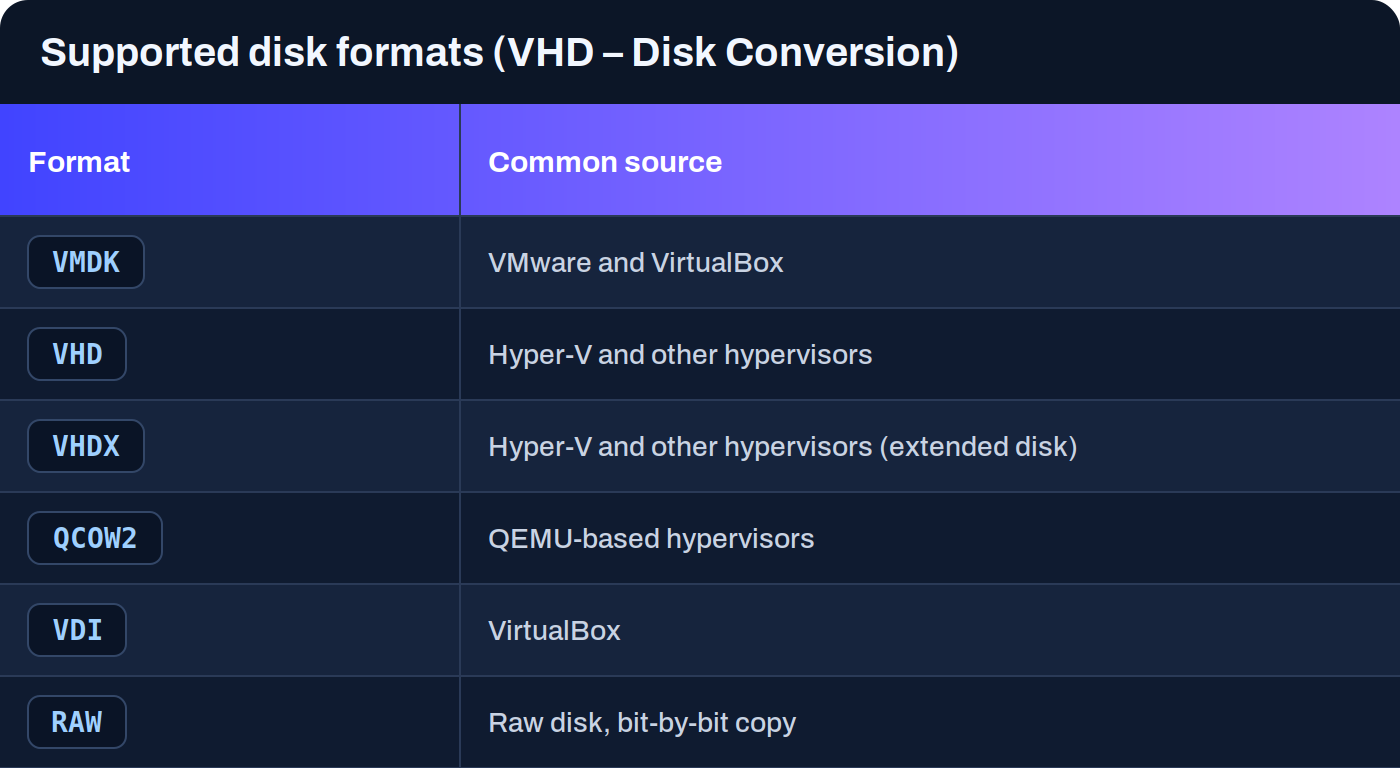
### VHD – Conversão de discos
Carrega discos virtuais em vários formatos e a plataforma converte-os automaticamente para que sejam compatíveis. É o caminho geral quando exportas o Disco a partir de um hipervisor ou de uma cloud.
Além destes formatos de disco, o fluxo contempla imagens **OVA** e os fluxos baseados em Acronis.
> #### 📘 Não tens de converter o Disco
>
> Se o formato de origem não for diretamente utilizável, a plataforma faz a conversão para um formato compatível. Tu entregas o Disco tal como o exportas da tua origem.
> #### 🚧 Compatibilidade consoante a origem
>
> A compatibilidade real depende da origem e do estado técnico do sistema. Alguns formatos tiveram limitações operacionais concretas, consoante o caso, por isso convém rever o guia da origem específica antes de lançar.
### Próximos passos
* Decide como o Disco chega ao Plenit em [Modos de transferência.](/docs-pt/productos/migrations/concepts/transfer.md)
* Consulta o guia da origem concreta que vais migrar na secção de [How-to.](/docs-pt/productos/migrations/how-to.md)
* Revê o percurso completo em [O processo.](/docs-pt/productos/migrations/concepts/the-process.md)
---
# Agent Instructions
This documentation is published with GitBook. GitBook is the documentation platform designed so that both humans and AI agents can read, navigate, and reason over technical content effectively. Learn more at gitbook.com.
## Querying This Documentation
If you need additional information that is not directly available in this page, you can query the documentation dynamically by asking a question.
Perform an HTTP GET request on the current page URL with the `ask` query parameter, and the optional `goal` query parameter:
```
GET https://docs.plenit.com/docs-pt/productos/migrations/concepts/formats.md?ask=&goal=
```
`ask` is the immediate question: it should be specific, self-contained, and written in natural language.
`goal` is optional and describes the broader end goal you are ultimately trying to accomplish on behalf of the user. GitBook uses it to tailor the answer towards what is most useful for that goal.
The response will contain a direct answer to the question and relevant excerpts and sources from the documentation.
Use this mechanism when the answer is not explicitly present in the current page, you need clarification or additional context, or you want to retrieve related documentation sections.