> For the complete documentation index, see [llms.txt](https://docs.plenit.com/llms.txt). Markdown versions of documentation pages are available by appending `.md` to page URLs; this page is available as [Markdown](https://docs.plenit.com/docs-en/productos/servers-2/how-to/ikev2-and-split-tunneling.md).
# New VPN Configuration Improvements: IKEV2 and Split Tunneling
These tunnel options give you more control over the connection: you choose the **IKE version** used in the negotiation and, when working with multiple remote networks, you decide whether to enable **Split Tunneling**.
All from the dashboard, on a tunnel you already have set up.
> #### 👍 What you get
>
> A tunnel tailored to your topology and to the device on the other end: with the right IKE version and, if you want, a separate SA for each remote network.
### Before you start
* Have access to the Plenit dashboard with permissions over the network subscription.
* Have a VPN tunnel already created and operational. If you don't have one yet, set it up first:[ How to create a site-to-site VPN tunnel.](/docs-en/productos/servers/how-to/how-to-create-a-site-to-site-vpn-tunnel.md)
* For Split Tunneling, have declared **at least two remote networks** in the tunnel.
### Step 1. Configure the IKE version
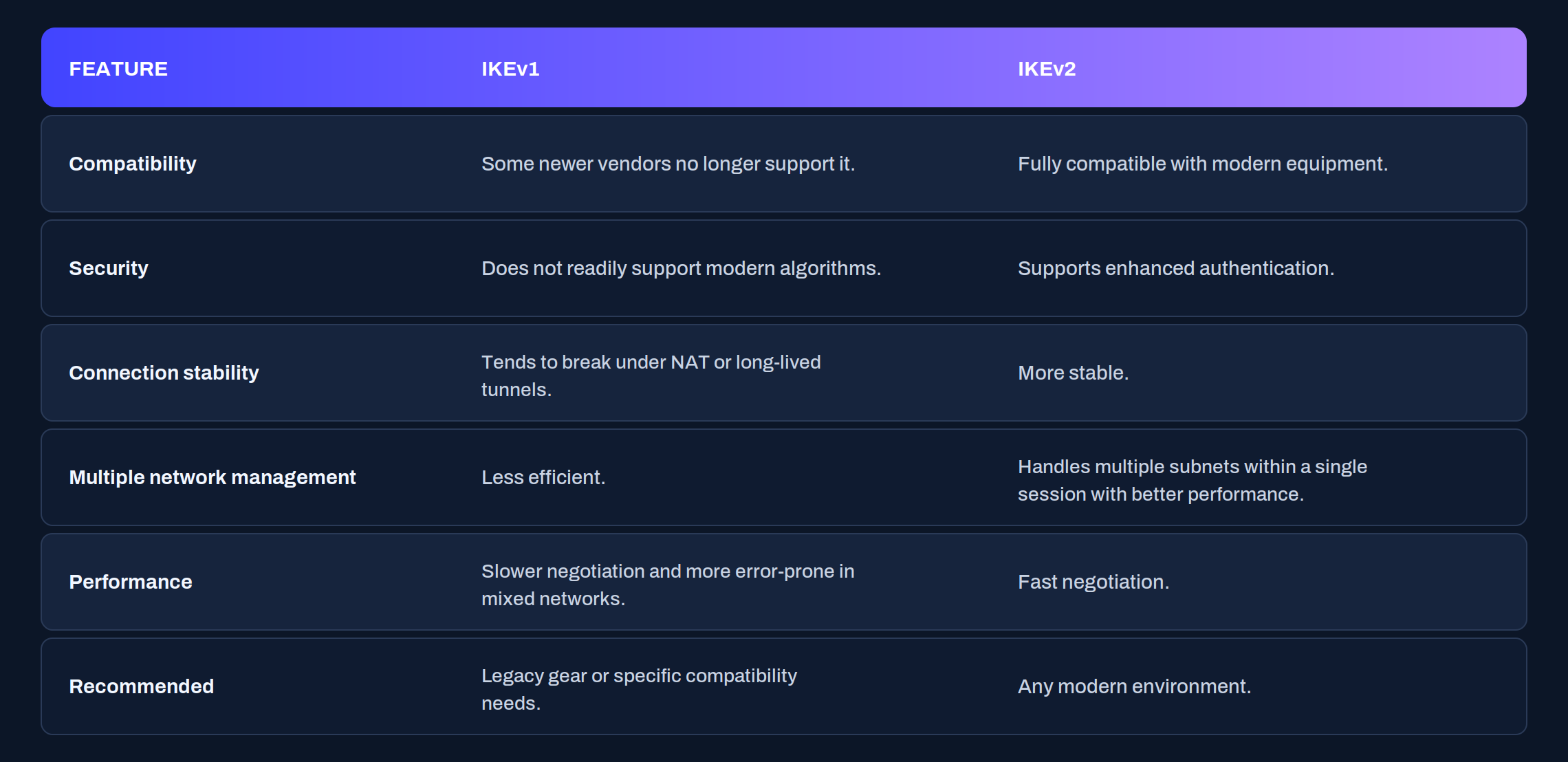
The platform lets you choose the IKE version used when negotiating the tunnel:
* **IKEv1**: use it only if the remote device does not support v2.
* **IKEv2**: the recommended one, for compatibility, security, and stability.
* **Automatic**: the platform decides based on who initiates the connection.
In automatic mode, if **Plenit initiates** the connection tries IKEv2 by default (and may not establish if the remote only accepts v1); if **Plenit responds** in passive mode, it adapts to the version proposed by the origin.
When to use each one: **IKEv2** if both endpoints support it; **IKEv1** only if the remote does not support v2; **Automatic** if you do not control who always initiates the connection. If problems appear in automatic mode, explicitly set v1 or v2.
> #### 🚧 Changing the version renegotiates the tunnel
>
> Changing the IKE version forces the connection to be renegotiated. Schedule the change during a window with no critical traffic.
### Step 2. Enable Split Tunneling
When you declare several remote networks in the same tunnel, Split Tunneling makes the platform create a **separate SA (Security Association) for each network**, instead of grouping them into one. This gives you flexibility to adapt the connection to your network design and the behavior of the remote device.
In some environments, a **single SA** (unified mode) works better; in others, separating the networks (Split Tunneling). The decision depends on your topology and on the recommendations of the manufacturer on the other end.
{/\* 📸 CAPTURE 2 · Split Tunneling control enabled (visible with two or more remote networks) \*/}

| Mode | What it does | When it fits |
| --------------- | ----------------------------------- | ----------------------------------------------- |
| Unified | A single SA for all remote networks | The remote device groups the networks into a SA |
| Split Tunneling | One SA for each remote network | You want to manage each network separately |
#### Conditions
* The Split Tunneling control **only appears with two or more remote networks** configured.
* **Requires IKEv2**: when you enable it, the platform automatically adjusts the tunnel version.
* If the remote end works with a single SA, the tunnel remains active and functional in **unified mode**.
#### Compatibility between manufacturers
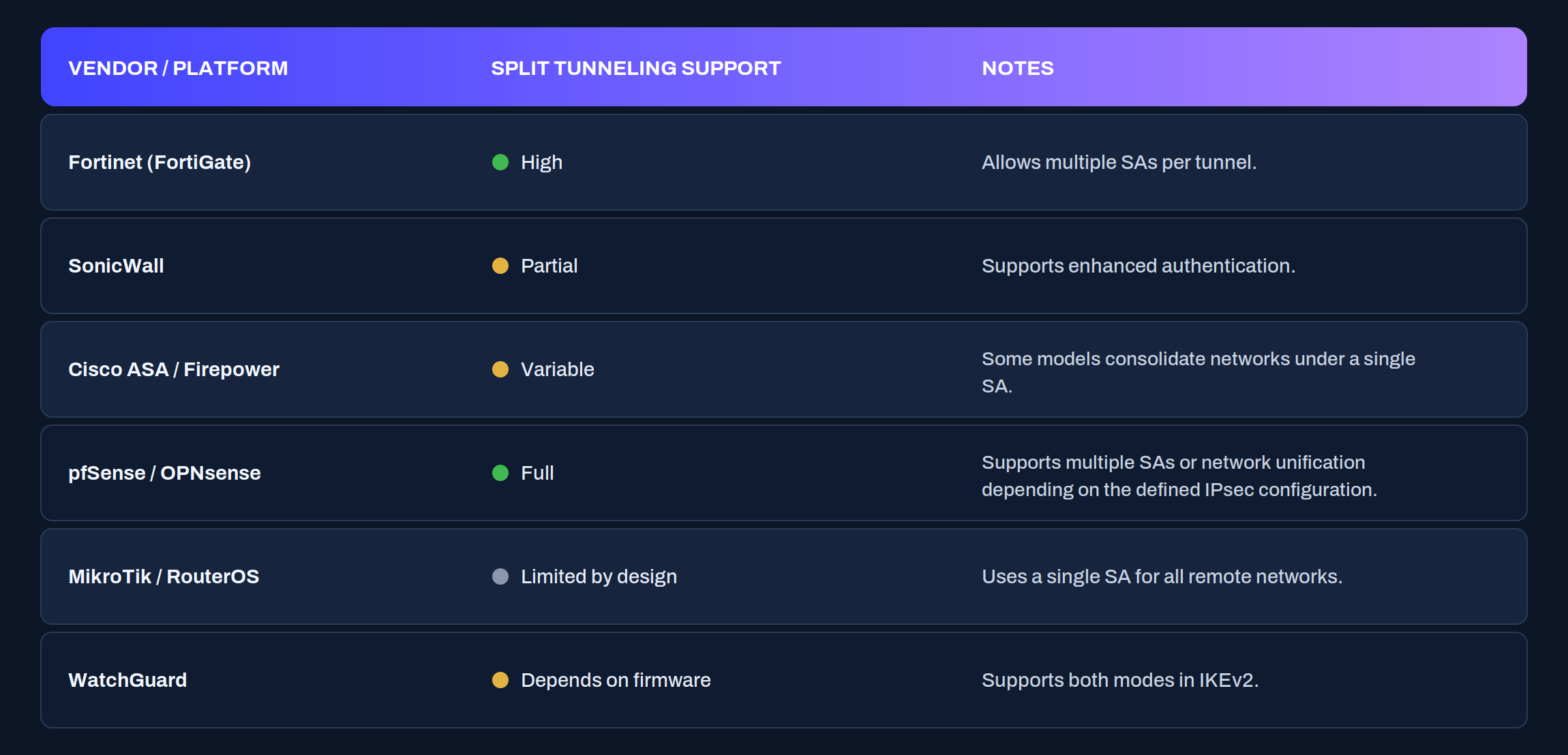
Each manufacturer groups or separates networks differently. This is not a compatibility issue: Plenit lets you choose the mode (unified or Split Tunneling) to adapt to your device. For reference:
### Check the configuration
After changing the IKE version or enabling Split Tunneling, confirm that the tunnel is still up and that each remote network routes. From a server on your local network, run `ping` to an IP in **each** declared remote subnet:
```bash
ping
ping
```
And check that there is a route to each remote subnet. On Linux:
```bash
ip route
```
In Windows, from PowerShell:
```powershell
route print
```
With Split Tunneling active, each remote network is validated separately: if one responds and another does not, the problem is in that specific network, not in the whole tunnel.
### If something does not fit
| Symptom | Likely cause | What to do |
| -------------------------------------------------- | ------------------------------------------------- | ---------------------------------------------------------------------- |
| The tunnel does not come up in Automatic mode | The remote only accepts IKEv1 and Plenit tried v2 | Explicitly set IKEv1 |
| The Split Tunneling control does not appear | There are fewer than two remote networks | Declare at least two remote networks in the tunnel |
| When enabling Split Tunneling, the version changed | Split Tunneling requires IKEv2 | This is expected behavior: adjust the change window |
| One remote network does not route and another does | That network's SA or route is misconfigured | Review that specific subnet with `ping` and `ip route` / `route print` |
### Conclusion
With these options, you adapt the tunnel to the reality of the other end: IKEv2 whenever you can, and Split Tunneling when you want to manage each remote network on its own.
The practical rule is simple: prioritize IKEv2 for compatibility and stability, and reserve unified mode for when the remote device can only work with a single SA.
---
# Agent Instructions
This documentation is published with GitBook. GitBook is the documentation platform designed so that both humans and AI agents can read, navigate, and reason over technical content effectively. Learn more at gitbook.com.
## Querying This Documentation
If you need additional information that is not directly available in this page, you can query the documentation dynamically by asking a question.
Perform an HTTP GET request on the current page URL with the `ask` query parameter, and the optional `goal` query parameter:
```
GET https://docs.plenit.com/docs-en/productos/servers-2/how-to/ikev2-and-split-tunneling.md?ask=&goal=
```
`ask` is the immediate question: it should be specific, self-contained, and written in natural language.
`goal` is optional and describes the broader end goal you are ultimately trying to accomplish on behalf of the user. GitBook uses it to tailor the answer towards what is most useful for that goal.
The response will contain a direct answer to the question and relevant excerpts and sources from the documentation.
Use this mechanism when the answer is not explicitly present in the current page, you need clarification or additional context, or you want to retrieve related documentation sections.