> For the complete documentation index, see [llms.txt](https://docs.plenit.com/llms.txt). Markdown versions of documentation pages are available by appending `.md` to page URLs; this page is available as [Markdown](https://docs.plenit.com/docs-en/productos/migrations/concepts/what-they-are.md).
# What are Migrations
What migrating in Plenit means, what you can move, and what to review before starting to avoid blockers.
Migrating in Plenit means moving servers, disks, backups, or environments from an external source (physical, virtual, or another provider) to the platform, so they are operational, manageable, and monitorable from the dashboard.
It's not just about copying data: the service chains together the transfer, format conversion, import, and, if you want, deployment of the target server and its final settings.
> #### 📘 In one sentence
>
> Move disks or servers from any provider or local environment to the platform in three steps. The wizard guides you from the start until everything is up and running.
### What you can migrate today
You can migrate **Servers** and related scenarios with **Remote Desktop**, using virtual disks, OVA, or Acronis-based flows depending on the case.
The source can be a physical or virtual server, and it can come from an on-premises environment, another hypervisor, or another cloud provider.
### What you will decide
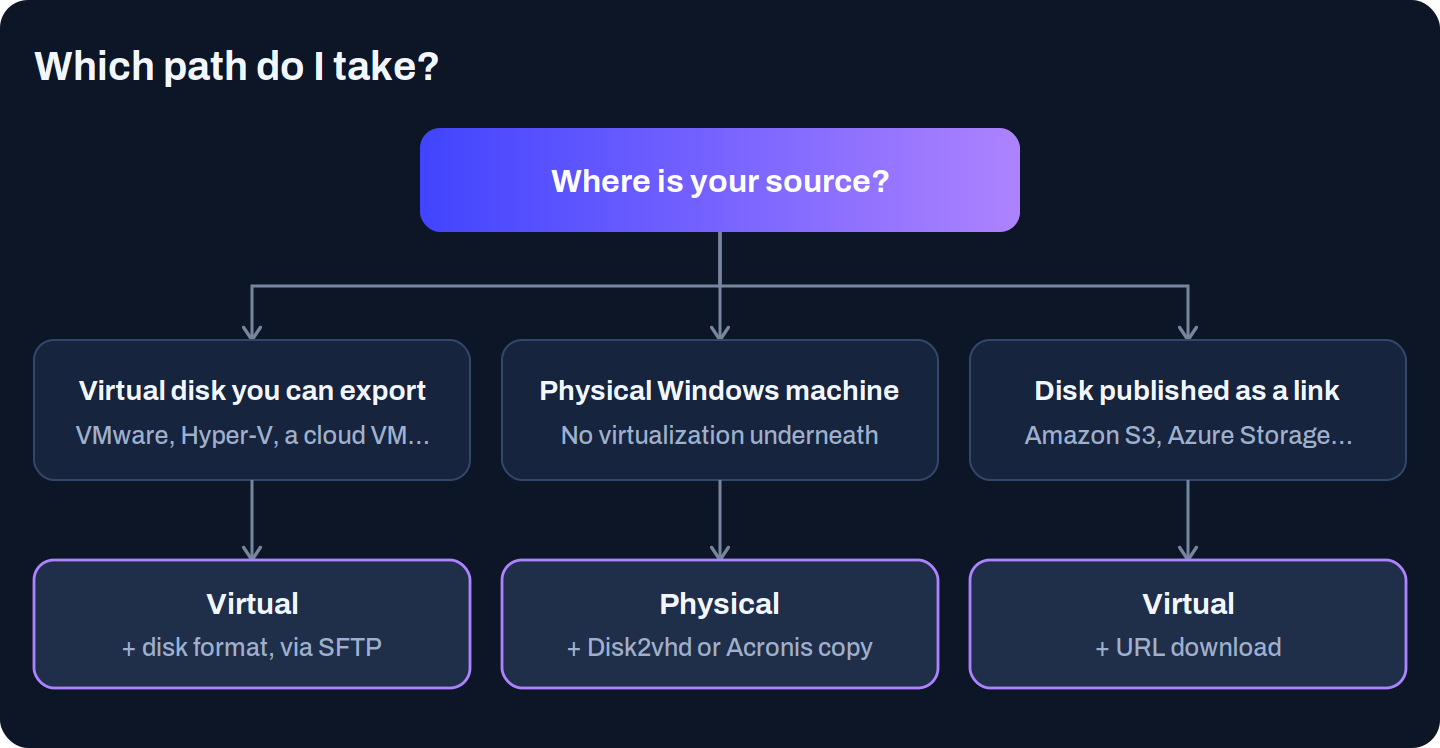
A migration is defined by four choices, and understanding them well is what prevents blocks halfway through the process: the **source** (physical or virtual), the **disk format** (Acronis Agent or VHD – Disk Conversion), the **transfer mode** (how the disk gets to Plenit) and the **destination** (just import the disks or also deploy a server). Each one has its own page in this section.
The starting point determines almost everything else. This is the initial decision depending on where you're coming from:
### Before you begin: what it's worth checking
These prerequisites are repeated in almost all migrations and prevent the process from getting stuck halfway:
* **Local administrator access** to the source machine.
* **Validated VPN** if there is site-to-site connectivity or network dependency.
* **Firmware identified**: BIOS or UEFI.
* **Unencrypted disks**: encrypted disks cannot be migrated.
* **Operating system and workload compatible** with the platform.
* **Well-defined disks**: number, size, and partitioning when applicable.
* **DHCP enabled** on all network cards.
> #### ❗️ Encrypted disks are not migrated
>
> This is a hard limitation of the current flow. If the source disk is encrypted, decrypt it before migrating or you won't be able to complete the process.
### Next steps
* Choose the starting point in [Physical or virtual source.](/docs-en/productos/migrations/concepts/source.md)
* Once you know the source, move on to [Disk formats](/docs-en/productos/migrations/concepts/formats.md) and [Transfer modes.](/docs-en/productos/migrations/concepts/transfer.md)
* To launch your first migration, go to the [Quick guide to the Migrations tool.](/docs-en/productos/migrations/quickstart.md)
---
# Agent Instructions
This documentation is published with GitBook. GitBook is the documentation platform designed so that both humans and AI agents can read, navigate, and reason over technical content effectively. Learn more at gitbook.com.
## Querying This Documentation
If you need additional information that is not directly available in this page, you can query the documentation dynamically by asking a question.
Perform an HTTP GET request on the current page URL with the `ask` query parameter, and the optional `goal` query parameter:
```
GET https://docs.plenit.com/docs-en/productos/migrations/concepts/what-they-are.md?ask=&goal=
```
`ask` is the immediate question: it should be specific, self-contained, and written in natural language.
`goal` is optional and describes the broader end goal you are ultimately trying to accomplish on behalf of the user. GitBook uses it to tailor the answer towards what is most useful for that goal.
The response will contain a direct answer to the question and relevant excerpts and sources from the documentation.
Use this mechanism when the answer is not explicitly present in the current page, you need clarification or additional context, or you want to retrieve related documentation sections.