> For the complete documentation index, see [llms.txt](https://docs.plenit.com/llms.txt). Markdown versions of documentation pages are available by appending `.md` to page URLs; this page is available as [Markdown](https://docs.plenit.com/docs-en/productos/migrations/concepts/formats.md).
# Disk Formats
The two format paths (Acronis Agent and VHD - Disk Conversion) and which formats each one supports.
When preparing the migration, you choose the format in which you deliver the disk. There are two paths, depending on where you are coming from.
### Acronis Agent
Upload an Acronis backup directly to deploy it later in Plenit. This is the path when your source already uses Acronis as backup software.
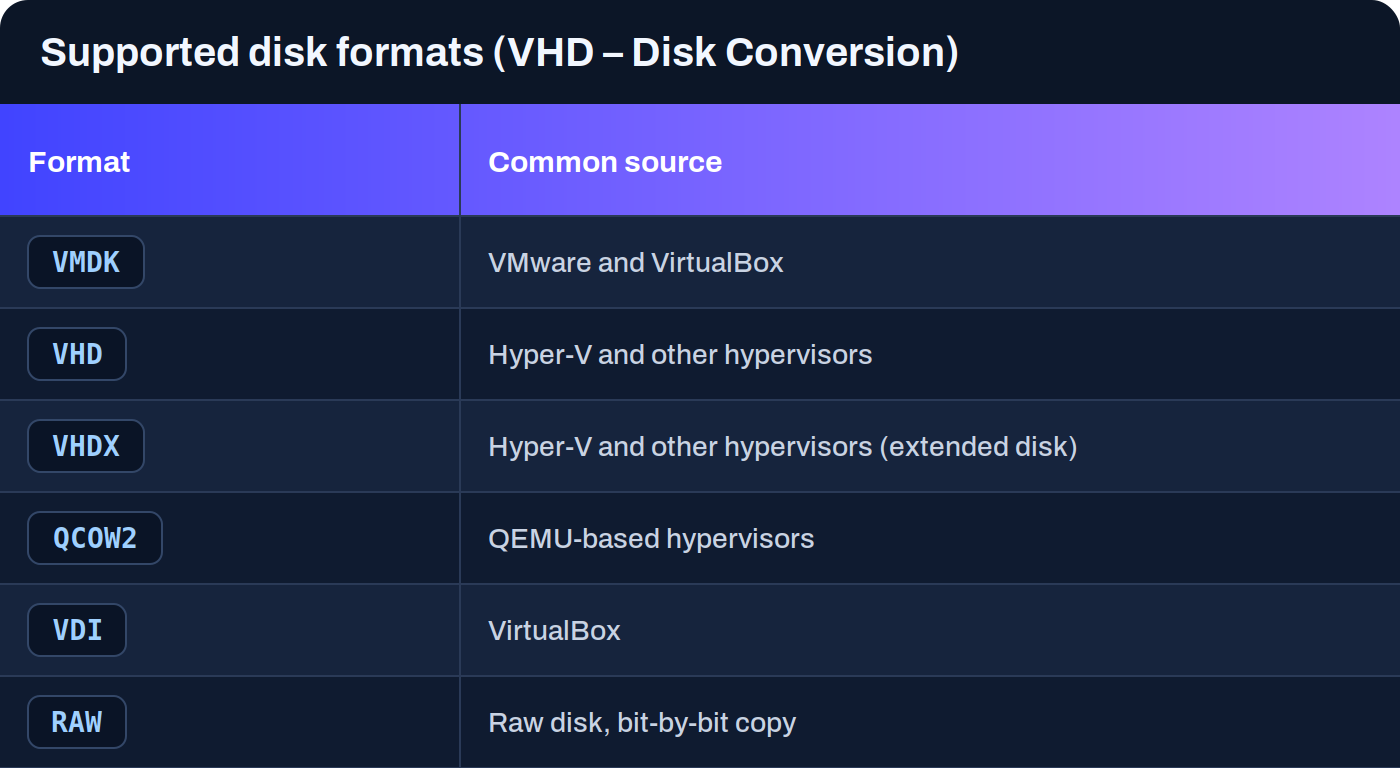
### VHD – Disk conversion
Upload virtual disks in various formats and the platform automatically converts them so they are compatible. This is the general path when you export the disk from a hypervisor or a cloud.
In addition to these disk formats, the workflow also includes images **OVA** and Acronis-based workflows.
> #### 📘 You do not have to convert the disk yourself
>
> If the source format cannot be used directly, the platform converts it to a compatible format. You provide the disk exactly as you export it from your source.
> #### 🚧 Compatibility depends on the source
>
> Actual compatibility depends on the source and the technical state of the system. Some formats have had specific operational limitations depending on the case, so it is advisable to review the guide for the specific source before starting.
### Next steps
* Decide how the disk reaches Plenit in [Transfer modes.](/docs-en/productos/migrations/concepts/transfer.md)
* Check the guide for the specific source you are going to migrate in the section of [How-to.](/docs-en/productos/migrations/how-to.md)
* Review the full journey in [The process.](/docs-en/productos/migrations/concepts/the-process.md)
---
# Agent Instructions
This documentation is published with GitBook. GitBook is the documentation platform designed so that both humans and AI agents can read, navigate, and reason over technical content effectively. Learn more at gitbook.com.
## Querying This Documentation
If you need additional information that is not directly available in this page, you can query the documentation dynamically by asking a question.
Perform an HTTP GET request on the current page URL with the `ask` query parameter, and the optional `goal` query parameter:
```
GET https://docs.plenit.com/docs-en/productos/migrations/concepts/formats.md?ask=&goal=
```
`ask` is the immediate question: it should be specific, self-contained, and written in natural language.
`goal` is optional and describes the broader end goal you are ultimately trying to accomplish on behalf of the user. GitBook uses it to tailor the answer towards what is most useful for that goal.
The response will contain a direct answer to the question and relevant excerpts and sources from the documentation.
Use this mechanism when the answer is not explicitly present in the current page, you need clarification or additional context, or you want to retrieve related documentation sections.